Short answer: yes, most advertising platforms will accept a virtual card, and Google Ads, for one, accepts one-time-use virtual cards as long as they carry a Visa or Mastercard logo. The trouble with virtual cards for ad spend rarely comes from the card being virtual; it usually comes from three duller things that people skip: what type of card it is, how the platform actually bills you, and the limits sitting on the card when the bill lands.
This guide is for online brands, agencies and media buyers juggling several ad accounts.
Key takeaways
The big ad platforms generally accept virtual Visa and Mastercard cards, but the fine print shifts with the platform, your country, your currency and your billing setting.
Card type matters more than people expect. Google won't take prepaid cards on automatic (postpay) billing, so find out whether your provider issues debit or prepaid cards before you lean on one.
A card per ad account, or per client, gives you a hard cap, tidier books and a much smaller blast radius when something breaks.
Declines usually trace back to a thin balance at the billing threshold, an authentication prompt nobody approved, or details that don't match. Swapping cards won't rescue a restricted ad account.
"Clean BINs" that stop bans don't exist. Platforms enforce their rules no matter whose card is on file.
Can you pay for ads with a virtual card?
Mostly, yes. A virtual card has a number, an expiry date and a security code, exactly like the plastic one in your wallet, so as far as an advertising platform can tell, it's simply another card on the same network. The platform details below come from each company's help documentation, reviewed in October 2026.
Google Ads
Google's payment methods page is unusually specific: it accepts one-time-use credit cards (it calls them virtual credit cards too) if they show a Visa or Mastercard logo, and in some countries AMEX, JCB or China UnionPay as well. In other words, virtual cards for Google Ads work, although a few operational details regularly trip people up:
Paying with a one-time card? Add $1 USD on top of the amount, because Google may run a tiny test charge first.
Prepaid cards aren't accepted for postpay, which is the setting where Google charges you after the ads have run.
If your card was issued in the European Economic Area, expect the occasional extra check, like a code sent to your phone.
Meta (Facebook and Instagram) ads
Meta lists the payment methods it accepts country by country in its Business Help Center, so look up your own country and currency before adding anything. Two lines in Meta's Advertising Standards matter more than the card list, though: agencies have to manage each advertiser or client through a separate ad account, and helping anyone evade Meta's enforcement is prohibited. Keep both in mind when you set up a virtual card for Facebook ads.
TikTok ads
TikTok keeps it brief: the methods you see depend on your billing country or region, your billing option and your currency. There are three billing options (Manual Payment, Automatic Payment and Monthly Invoicing), and you need a valid method on file, such as a debit or credit card, or delivery can stall. To see what's open to you, go to Tools, then Billing.
These rules change regularly, so check the current help page for your country before you set up billing, not after the first decline.
Prepaid, debit or credit: why the card type matters
"Virtual card" describes the format, not the money behind it, and underneath there are three quite different financial products.
Prepaid cards spend a balance you've loaded ahead of time, and the networks often treat them as their own category.
Debit cards pull from money that already sits in your business account.
Credit cards borrow against a line you pay back later.
Why would an advertising platform care? Automatic billing charges you after the ads have already run, so in effect the platform is extending you a little credit and expecting the card to cover spending that has already happened. That's the reasoning behind Google refusing prepaid cards on postpay.
So ask the boring question first: is your virtual card debit or prepaid? Check whether your provider issues debit or prepaid cards, and how those cards are presented to merchants. If you're uncertain, pick a manual or prepay setting where the platform offers one and fund the account before launch.
How ad platforms charge your card
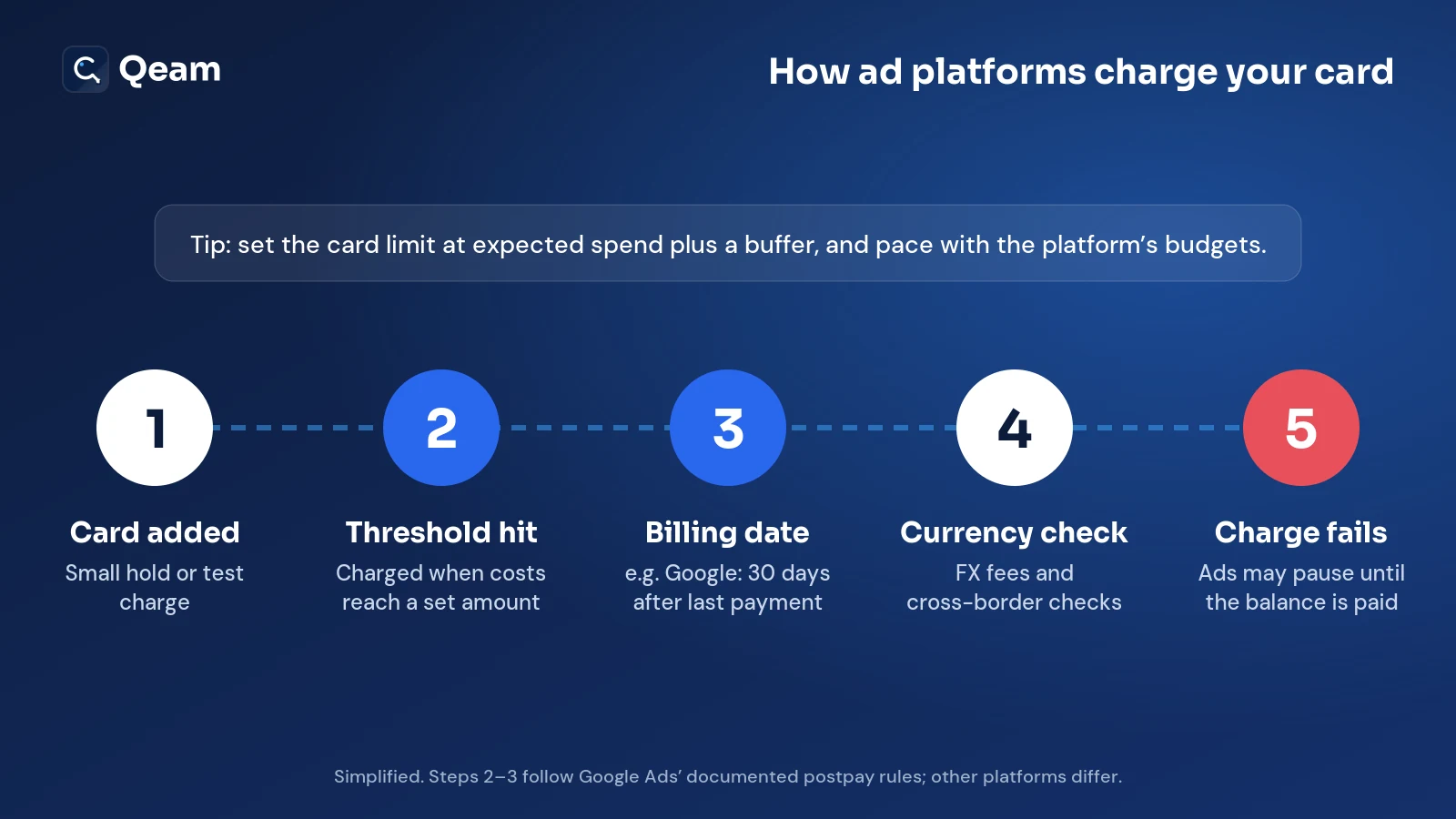
The platforms differ in the details, but the overall rhythm is similar, and because Google documents its version most clearly, we'll use it as the example.
You add the card. A small authorisation hold or test charge may appear, and Google says its pre-authorisation hold disappears automatically within a week.
You reach the billing threshold. On automatic billing, the card is charged once your accumulated costs reach a predetermined amount.
The billing date comes round. Google charges 30 days after your last automatic payment or when you reach the threshold, whichever happens first.
Currency gets converted, if it has to. An ad account in one currency and a card in another means conversion fees, and cross-border charges can set off extra fraud checks.
A charge bounces. Your advertising may pause until the outstanding balance is cleared.
Here's a hypothetical but very typical case: someone sets a €300 weekly budget on a card capped at €250, the threshold charge arrives, it exceeds the cap, and the card declines. The fix isn't complicated: set the card limit at expected spending plus a buffer, and let the platform's own budget settings handle pacing.
How to structure virtual cards for ad spend
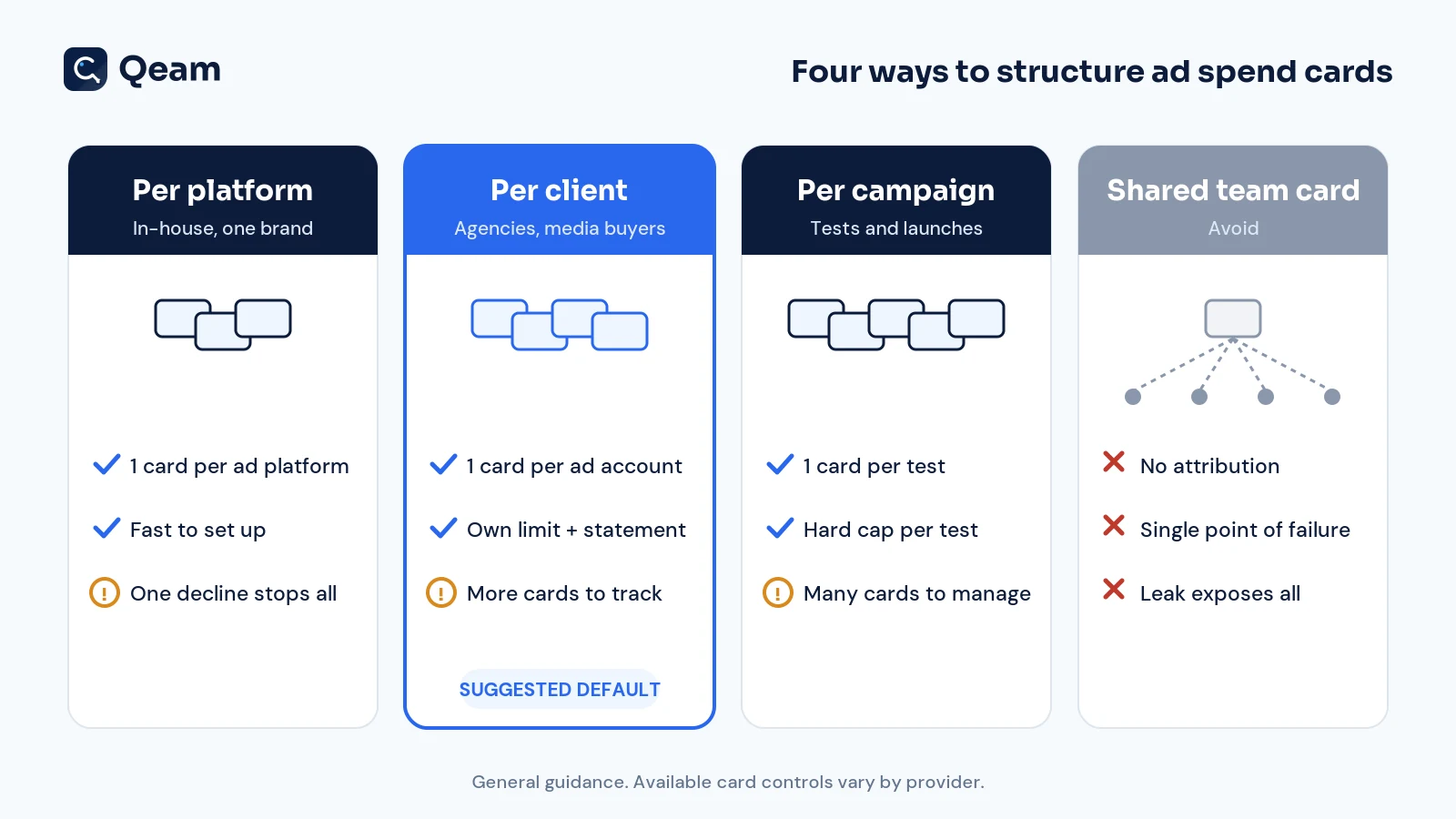
The real advantage of virtual cards for ad spend is that you're not limited to one, and the way you divide them determines how much control you actually get. Most teams settle on one of four arrangements.
One card per platform
Best for: in-house marketing teams managing a single brand.
Upside: it takes minutes to configure, and each platform's total spending is visible immediately.
Catch: when that single card fails, every campaign on the platform stops simultaneously.
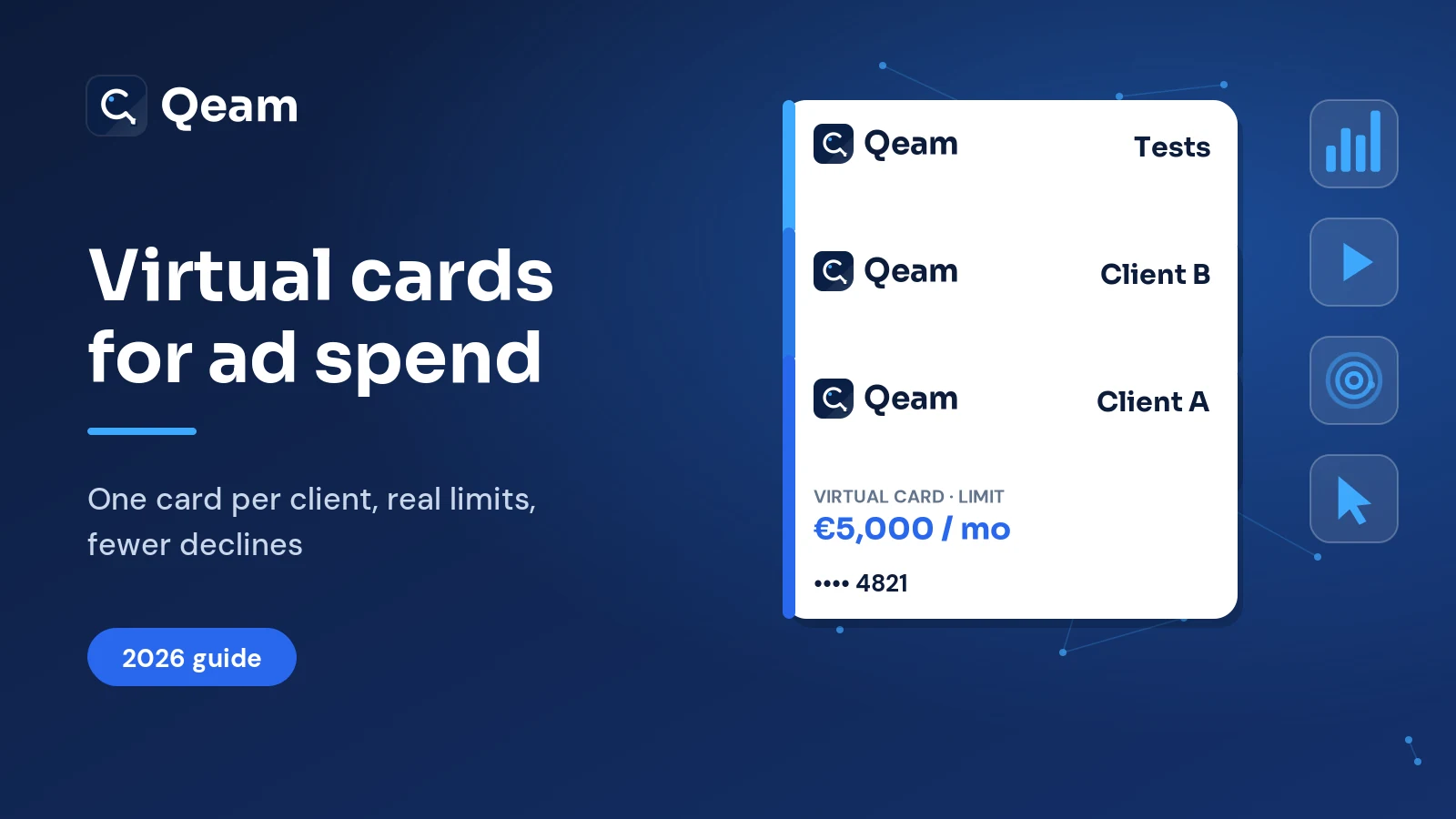
One card per ad account or client
Best for: agencies and independent media buyers.
Upside: every client receives its own limit and statement, which makes re-billing painless, and the arrangement matches Meta's separate-account requirement for clients.
Catch: there are more cards to name, monitor and reconcile.
One card per campaign or test
Best for: experiments, product launches and seasonal promotions.
Upside: each test has a hard ceiling, and you can freeze the card the day the test finishes.
Catch: dozens of cards quickly become difficult to manage, so reserve this approach for tests where the cap genuinely matters.
One shared team card (skip it)
Why it hurts: nobody can attribute spending to a person or client, a single decline or freeze interrupts everything, and one leaked number exposes every connected account.
Our suggested default is one card per client or ad account; split down to campaign level only for tests above a spending threshold your team agrees on.
Spend controls worth setting on every ad card
What you can configure depends on your provider, so review the available settings. For advertising spend, these are the controls that earn their keep:
Card limits: a daily, monthly or lifetime cap that mirrors the approved budget.
Merchant restrictions: some providers let you lock a card to certain merchants or merchant categories. Ad charges are often coded as advertising services, which is merchant category code 7311 on Visa's list, but look at your own statement to see how each platform's charges really come through.
Freeze and unfreeze: stop a card the moment a client leaves or a campaign ends.
Single-use or recurring: single-use for one-off top-ups, recurring for automatic billing.
Real-time alerts: a notification on every charge, so a decline doesn't sit unnoticed over a weekend.
Why ad payments get declined, and how to fix them
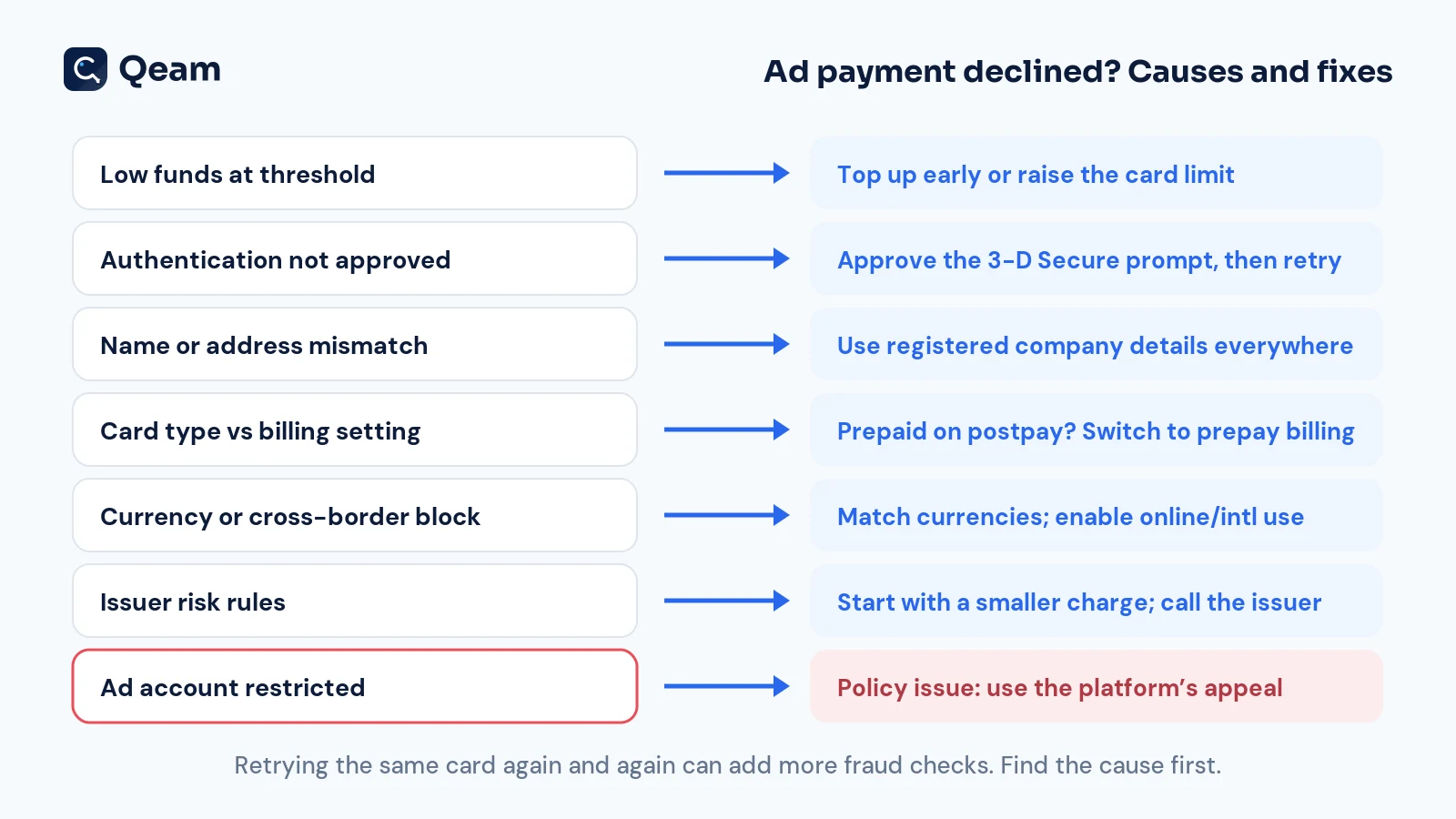
When a payment fails, work out the reason before you retry, because hammering the same card repeatedly tends to trigger additional fraud checks rather than fewer.
Insufficient funds at the threshold. Top up ahead of time, or increase the limit to cover the next expected charge.
Authentication left hanging. In the EU, PSD2 (Article 97) requires strong customer authentication for many online payments, so approve the prompt in your banking or card app and then try again.
Name or address mismatch. Use your company's registered name and address on both the card and the ad account.
Card type unsupported by the billing setting. A prepaid card on Google's postpay setting won't work, so move to prepay billing or use a different card type.
Currency or cross-border restrictions. Match currencies where possible, and ask your provider whether online and international transactions are enabled.
Issuer risk rules. A brand-new card with a large first charge can look unusual to an issuer's risk engine, so start smaller and contact your provider if declines continue.
A restricted ad account. That's a policy problem rather than a payment one, so use the platform's review or appeal process instead of swapping cards.
"Clean BINs" and banned ad accounts: what a card can't fix
You'll find sellers advertising "clean BINs" or cards that supposedly keep ad accounts safe from bans. A BIN is just the first few digits of a card number, the part that identifies the issuing institution, and it has nothing to do with whether your ads follow the rules.
Platforms police accounts and businesses rather than card numbers, and Meta's Advertising Standards say plainly that helping anyone evade its enforcement is prohibited. Cycling through new cards to get back onto a restricted account breaks platform terms, may break your card provider's terms too, and Qeam.net won't support it.
Receipts, VAT and reconciliation
Month-end reconciliation is far less painful with a consistent routine. Download every platform's invoice each month, match it to the card charges by card name, and keep invoices and statements together per client. Agencies can re-bill directly from card-level exports, and if clients pay you by bank transfer, virtual IBANs make the matching easier.
On VAT, look at who issued the invoice and from which country. In the EU, when a business buys services from a supplier established in another member state, the reverse charge may apply. Under Article 196 of the VAT Directive, the business customer then accounts for the VAT itself. Your individual circumstances determine the correct treatment, so confirm it with your accountant. This is general information, not tax advice.
Checklist: choosing a virtual card provider for ad spend
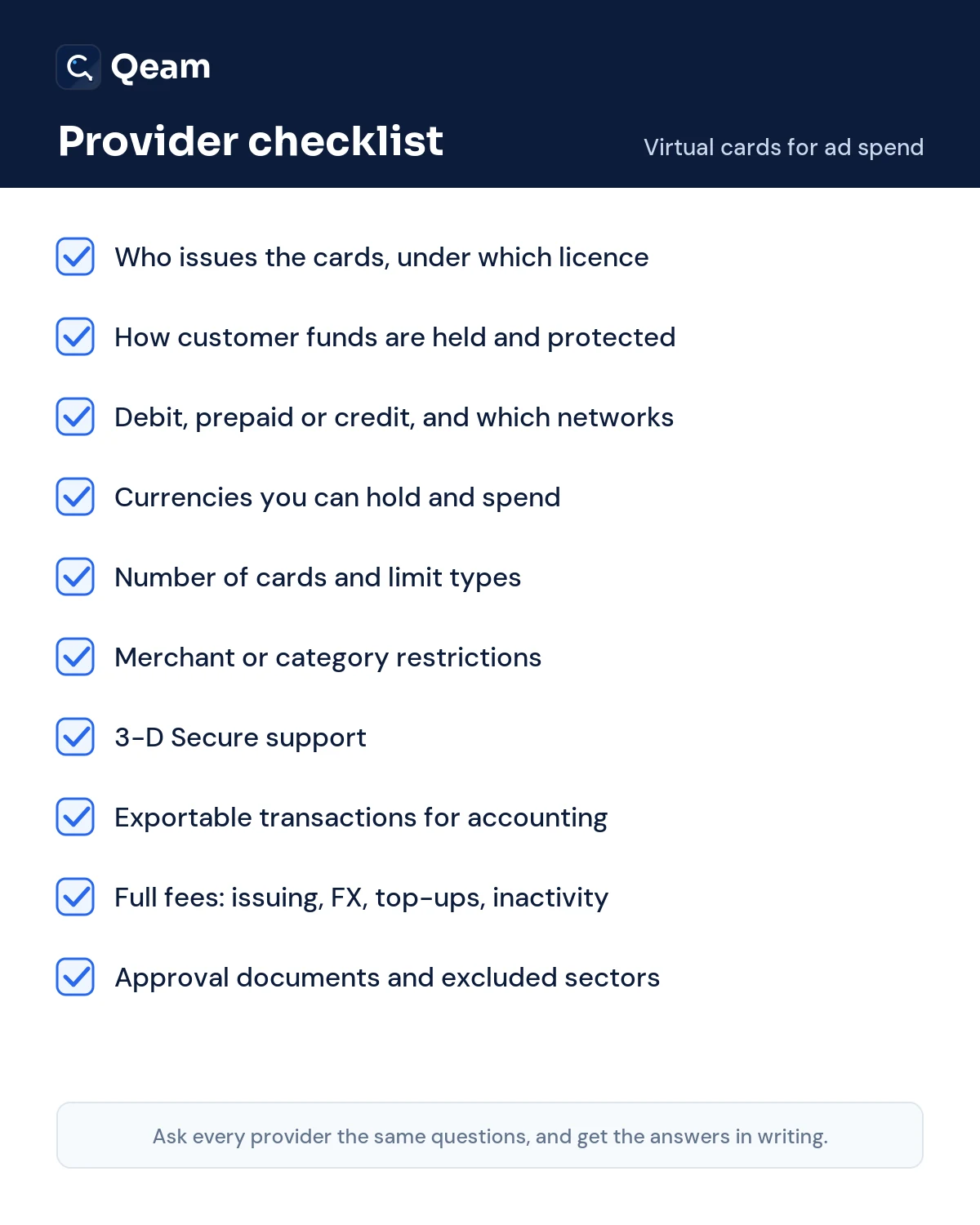
Ask every provider the same questions, in writing:
Who issues the cards, and under which licence?
How are customer funds held and protected?
Are the cards debit, prepaid or credit, and on which networks?
Which currencies can you hold and spend?
How many cards can you create, and what limits can you set?
Can you restrict cards to specific merchants or merchant categories?
Do the cards support 3-D Secure?
Can you export transactions to your accounting tools?
What are the full fees for issuing, foreign exchange, top-ups and inactivity?
Which documents are required for approval, and which industries or countries are excluded?
How Qeam.net helps
Qeam.net is a technology platform, not a bank or an electronic money institution. Its virtual cards are issued by a card-issuing partner under licence from Mastercard. If you want the background, we've covered what a virtual debit card is, how corporate debit cards with spend controls work, and how businesses issue cards inside their own product.
Every account and card goes through business verification, and approval isn't guaranteed. No card provider can promise that an ad platform will accept a card or keep an account live. Our regulatory information has the details, or you can check your eligibility.
Frequently asked questions
Can I use a virtual card for Facebook ads?
Usually, provided the card runs on a network Meta accepts in your country. If you manage advertising for clients, give each client a separate ad account.
Does Google Ads accept virtual cards?
Yes. Google accepts one-time-use virtual cards displaying a Visa or Mastercard logo, and additional networks in some countries, so remember to add $1 USD to your payment for card verification.
Can I use a prepaid card for ads?
Sometimes. Google won't accept prepaid cards on postpay billing, although prepay may work, and other platforms set their own rules for each billing option, so confirm before relying on one.
Why is my card declined on Facebook or Google Ads?
The usual culprits are insufficient funds at the threshold, an unapproved authentication request, mismatched company details or a card type the billing setting doesn't support.
How many virtual cards does an agency need?
Begin with one per client or ad account, and introduce additional cards only for experiments that need their own spending cap.
If my card limit is reached, do my ads stop?
They can. If the platform cannot charge the card at the threshold, it may pause delivery until the outstanding balance is paid.
Is a virtual card safer than a physical card for ad spend?
It can be, because each card has its own number, limit and freeze control, so a leaked number affects only one card.
What is the best card for ad spend?
The best card for ad spend is the one that suits your billing setting, monthly volume, currencies and required controls, so evaluate every option against the checklist above.
The bottom line
Virtual cards are a practical way to pay for advertising on Meta, Google and TikTok. Get the card type right for your billing setting, give each client its own card, and set limits that match real budgets. When a payment fails, fix the underlying cause instead of swapping cards, because no card can solve a policy problem.
This article was written with AI assistance and reviewed by the Qeam.net editorial team. It is general information, not financial, legal or tax advice. Platform rules change, so check each platform's current help pages.